
Standardize Invoice Reviews with a Clear Approval Flow
A practical flowchart template for finance, operations, and procurement teams managing invoice intake and approval routing.
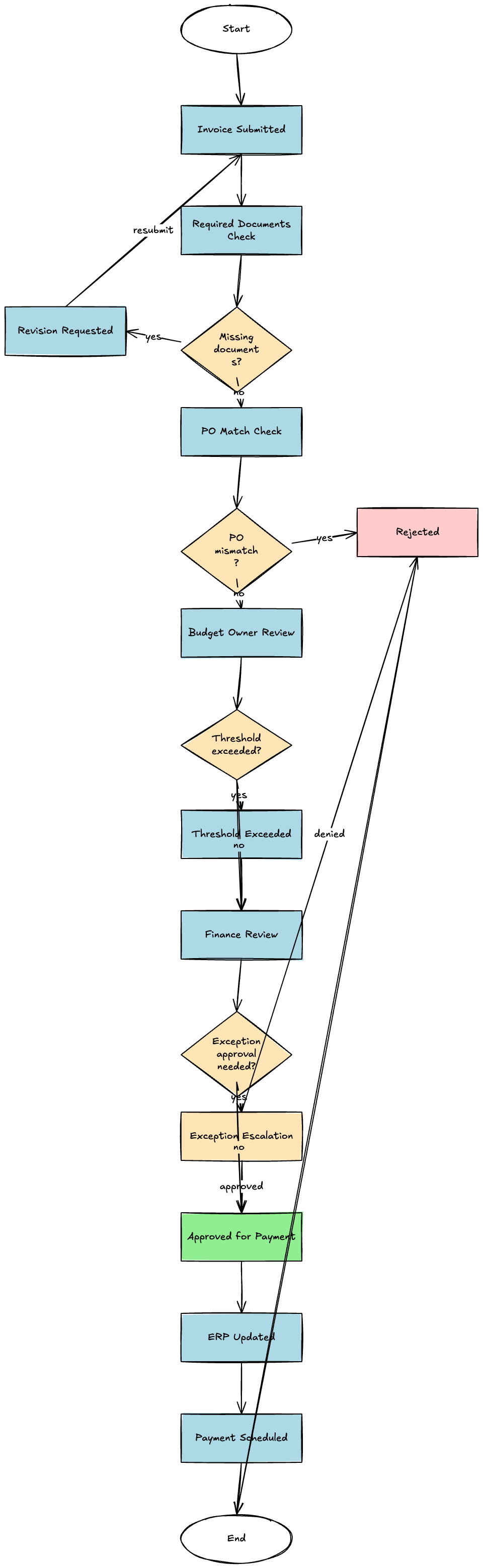
Problem This Template Solves
Invoice approvals often slow down because supporting documents are incomplete, spending thresholds are inconsistent, and ownership changes between requesters, budget owners, finance reviewers, and AP teams. This template gives teams a single workflow view so they can reduce delays, handle exceptions consistently, and move approved invoices to payment faster.
How to Use
-
Step 1
Capture Invoice Intake
Start with invoice submission, vendor details, PO reference, due date, and required attachments so incomplete requests can be flagged immediately.
-
Step 2
Route by Policy and Threshold
Add decision branches for missing documentation, PO mismatch, budget owner signoff, and escalated review when the invoice exceeds approval thresholds.
-
Step 3
Approve, Reject, or Send Back
Show final outcomes for approval, rejection, or revision and include downstream actions such as ERP status updates, requester notifications, and payment scheduling.
Prompt to Generate
Create an invoice approval workflow flowchart with nodes: Invoice Submitted, Required Documents Check, PO Match Check, Budget Owner Review, Finance Review, Threshold Exceeded, Exception Escalation, Revision Requested, Approved for Payment, Rejected, ERP Updated, Payment Scheduled. Use decision diamonds for missing documents, PO mismatch, approval threshold, and whether exception approval is required.
FAQ
Who should use this invoice approval template?
It is designed for finance operations, accounts payable, procurement teams, and department leaders who need a shared approval path for vendor invoices.
Can I adapt it for purchase requests or expense approvals?
Yes. Keep the intake, validation, reviewer routing, and final decision structure, then swap the policy checks and approver roles for your specific approval process.
Related Templates
Build Your Own Version in Minutes
Start with this template and customize every node in the AI editor.
Open in Editor